Learniwo
For students

Your learning
adventure awaits.

Learn a little, play a lot and collect rewards every day.

🧠Brain challengeA new puzzle every day
🎤Quiz showBeat your best score
🎙️Speak & get a bandEnglish, IELTS-style
⏱️30-min focusUnlock a surprise gift
🏆Badges & certificatesGold, silver, bronze
🎡PlaylandRooms, outfits, surprises
Today's focus24 / 30 min
🔥 14
Learniwo

Learning that feels
like play.

School lessons, timed tests, life skills, English and a safe AI tutor, all in one place for your family.

  • 📚Lessons made easyNotes, flashcards and games from your child's own class notes
  • 🗣️English, IELTS-styleSpeaking, writing, reading and listening bands for each grade
  • 🌱Life skillsMoney, communication, creativity and feelings
  • 🛡️Safe AIA study-only tutor. Parents see everything
Streak🔥 14 days
SpeakingBand 7
October🏅 Star Learner

The learning home for your family.

Lessons, tests, English, life skills, a safe AI tutor and every school email, together in one place. From Pre-school to Grade 10, with both parents always in the loop.

No card needed · Every family checked and approved · Works on any computer, tablet or phone

Are you a student?
learniwo.com
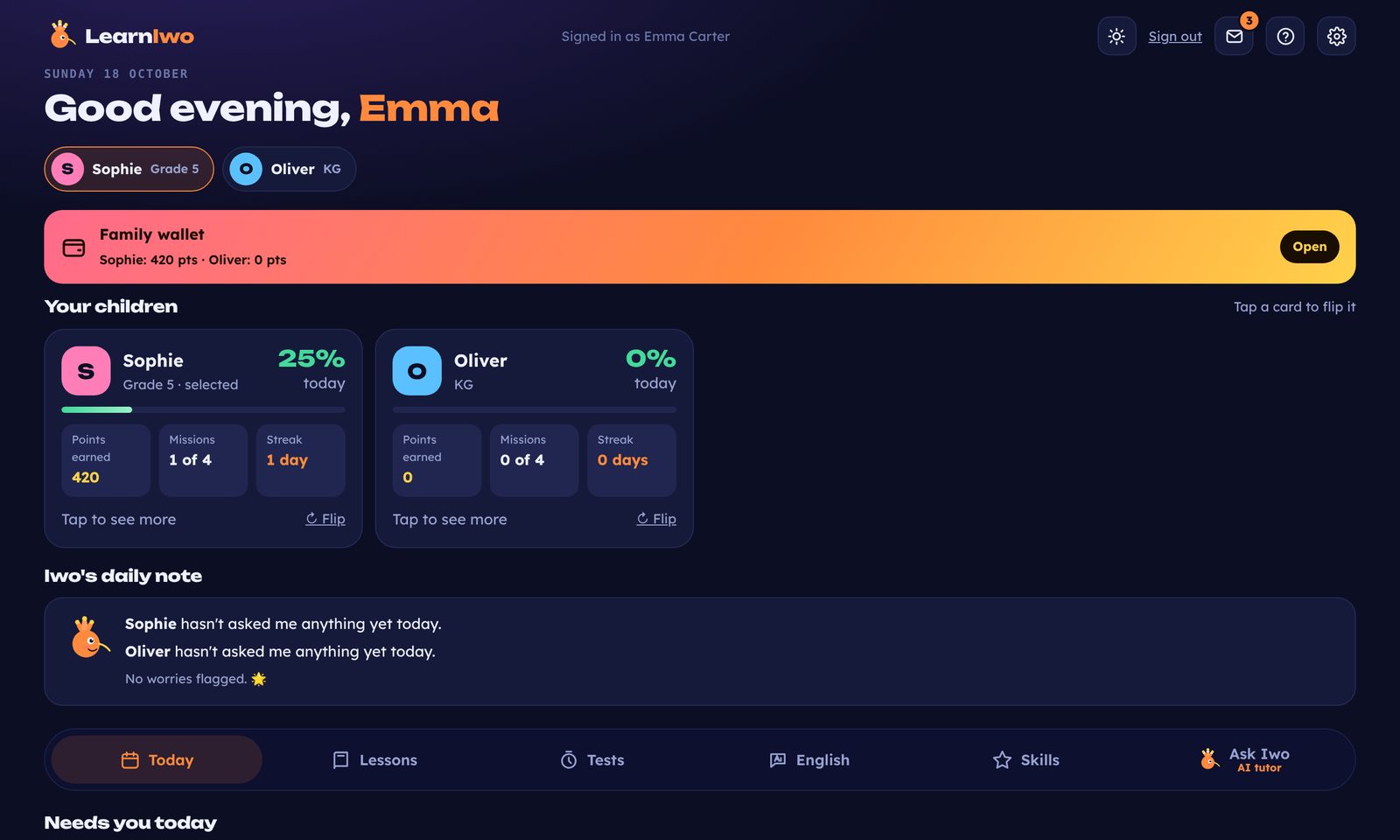
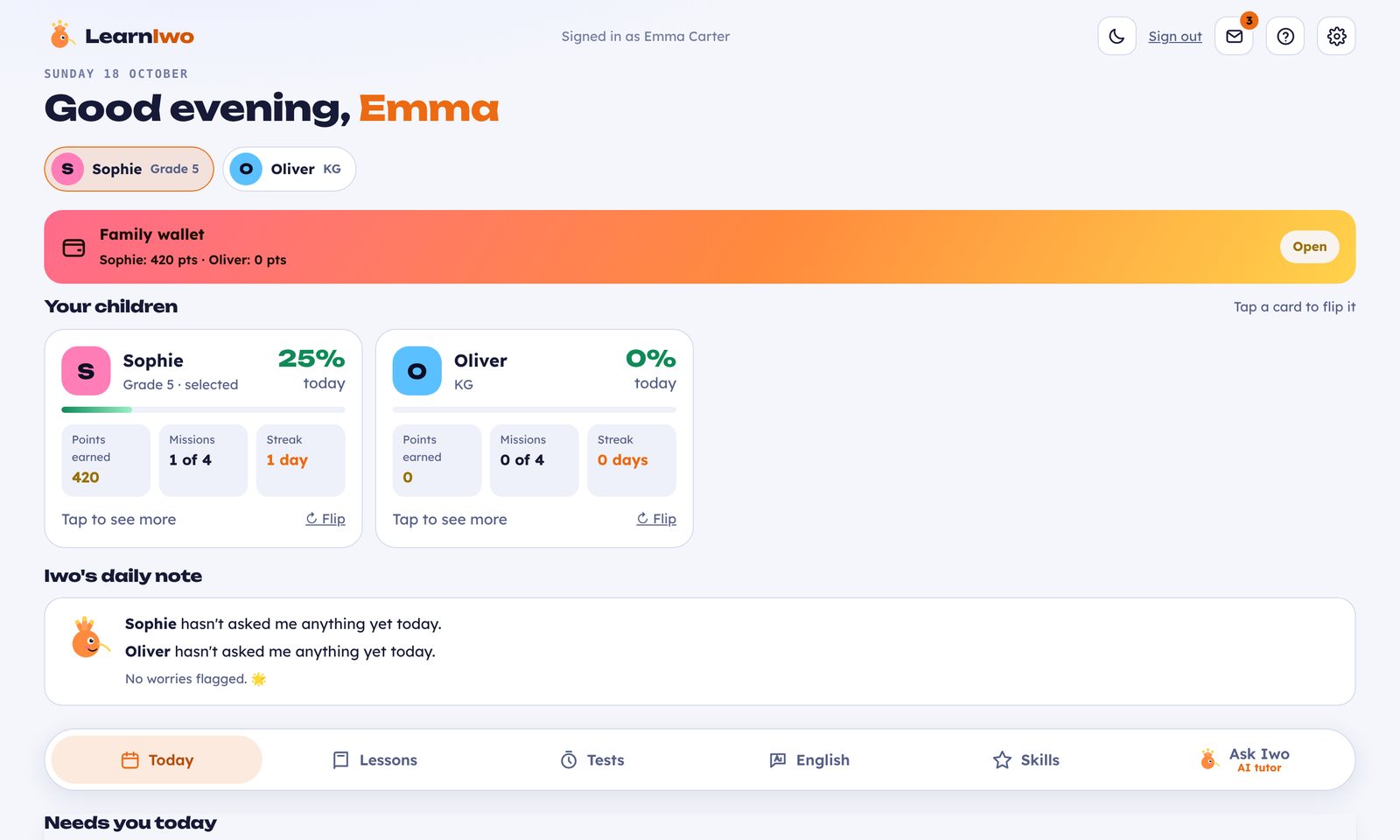
The Learniwo parent dashboard: each child's progress today, the family wallet and Iwo's daily noteThe Learniwo parent dashboard: each child's progress today, the family wallet and Iwo's daily note
GNEW SCHOOL EMAIL · SOPHIETerm 2 science project packGreenwood School · 2 files
SOPHIE · GRADE 5 · TODAY
18of 30 focus minutes
One platform

Everything your child's learning needs, without the five apps.

Most families juggle school emails, Teams files, practice sheets and separate apps. Learniwo brings it into one calm daily routine.

01

Study

Lessons from your child's own school files, timed tests that find mistakes, and a 30-minute daily plan.

02

Grow

English speaking, writing and reading, plus life skills in communication, money, creativity and feelings.

03

Stay organised

Every school email in one inbox, sorted by child, with files, and a tick when it's done.

04

Stay safe

An AI tutor that teaches rather than answers, with a daily safety note for parents.

The video couldn't load.

Quick tour

See the whole of Learniwo in under a minute.

School emails in one inbox, lessons, tests, life skills and English, plus the games and reports that keep both parents in the loop.

For students

A clear plan for every day, built from school.

Upload a worksheet or a Teams file and Iwo turns it into easy notes, flashcards and a short quiz. Your child opens Learniwo and knows exactly what to do next.

  • Today's plan and a 30-minute focus timer with streaks and missions
  • Timed tests: 20 questions in 30 minutes, maths checked from a photo
  • Fix-it lessons for every mistake, until it sticks
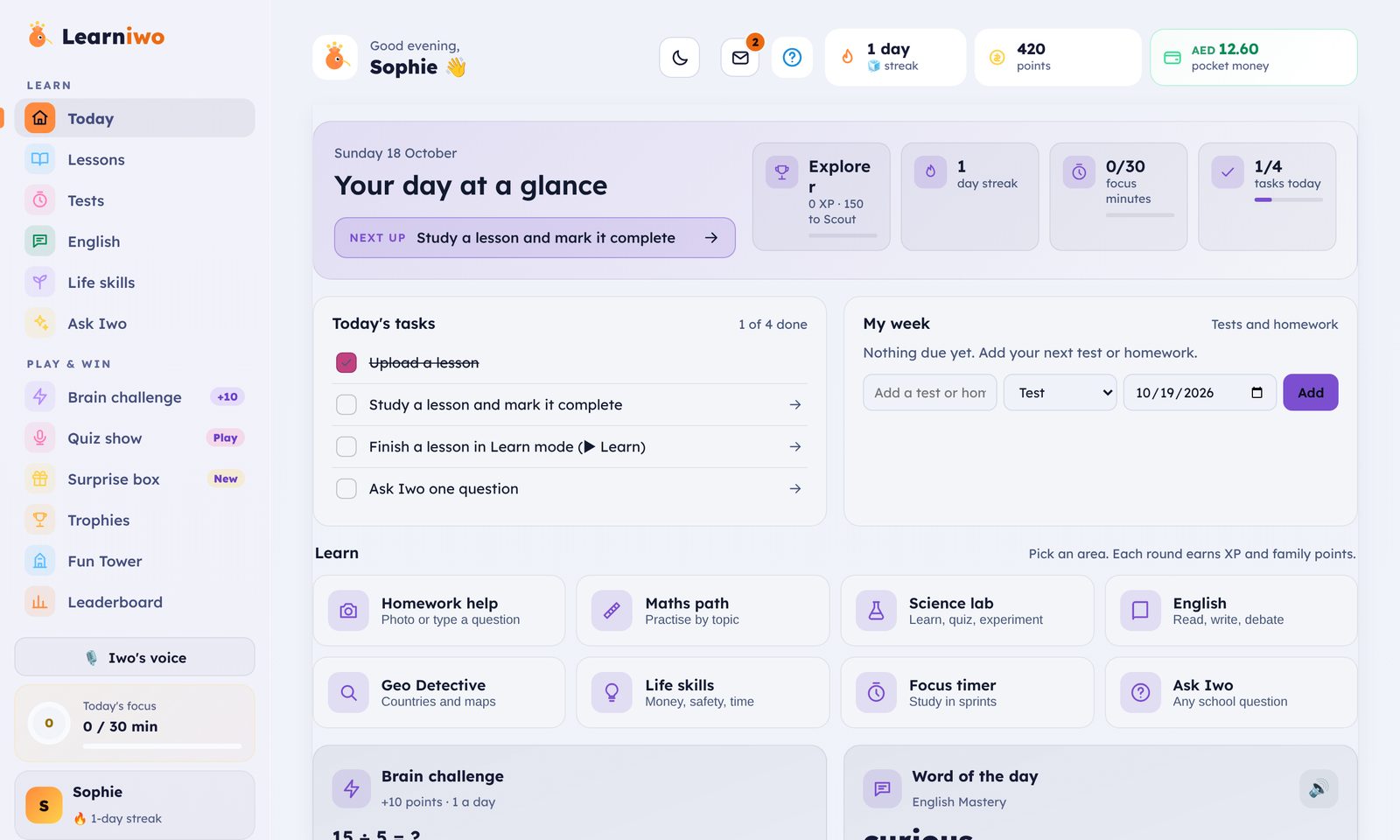
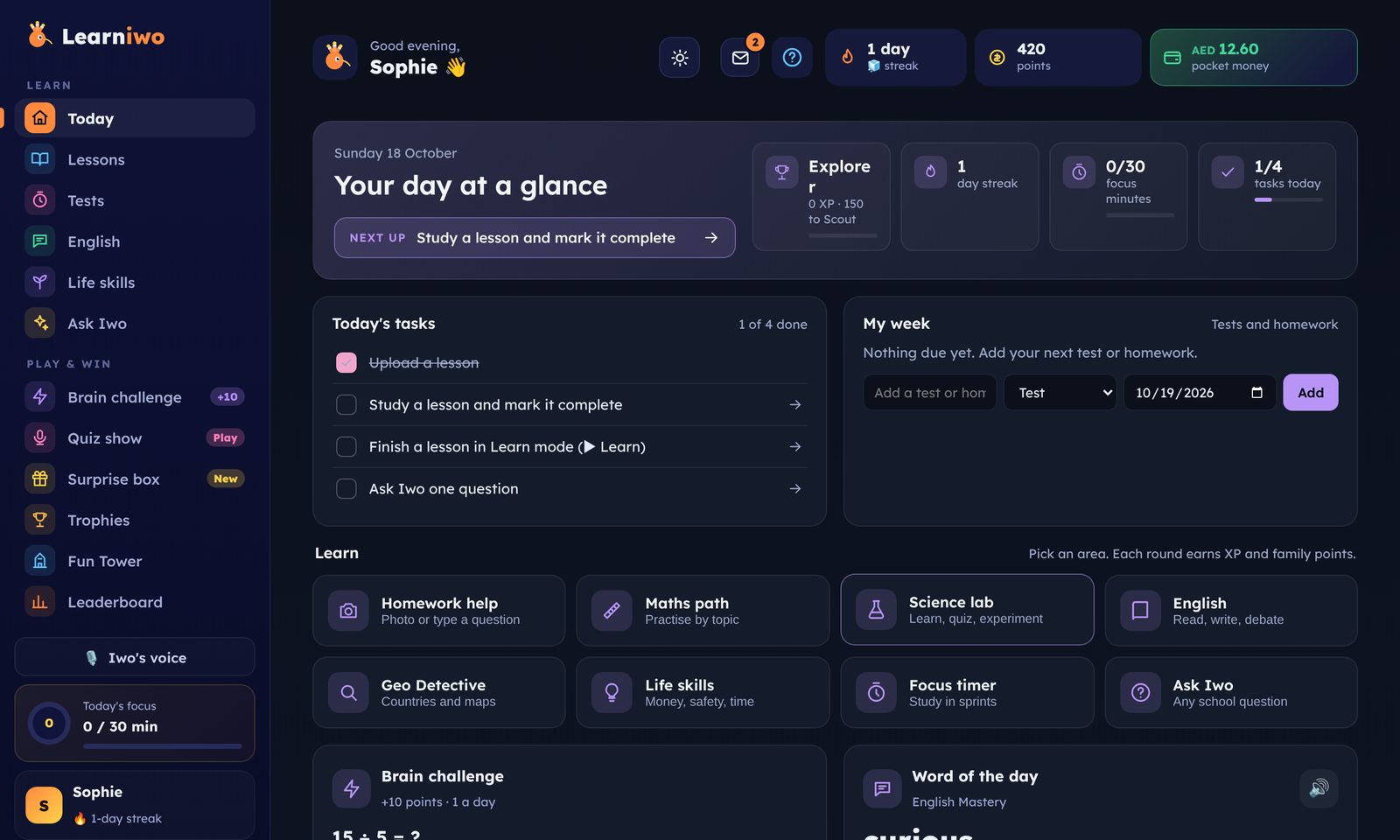
A Grade 5 student's Today page: next lesson, focus minutes, tasks and learning areasA Grade 5 student's Today page: next lesson, focus minutes, tasks and learning areas
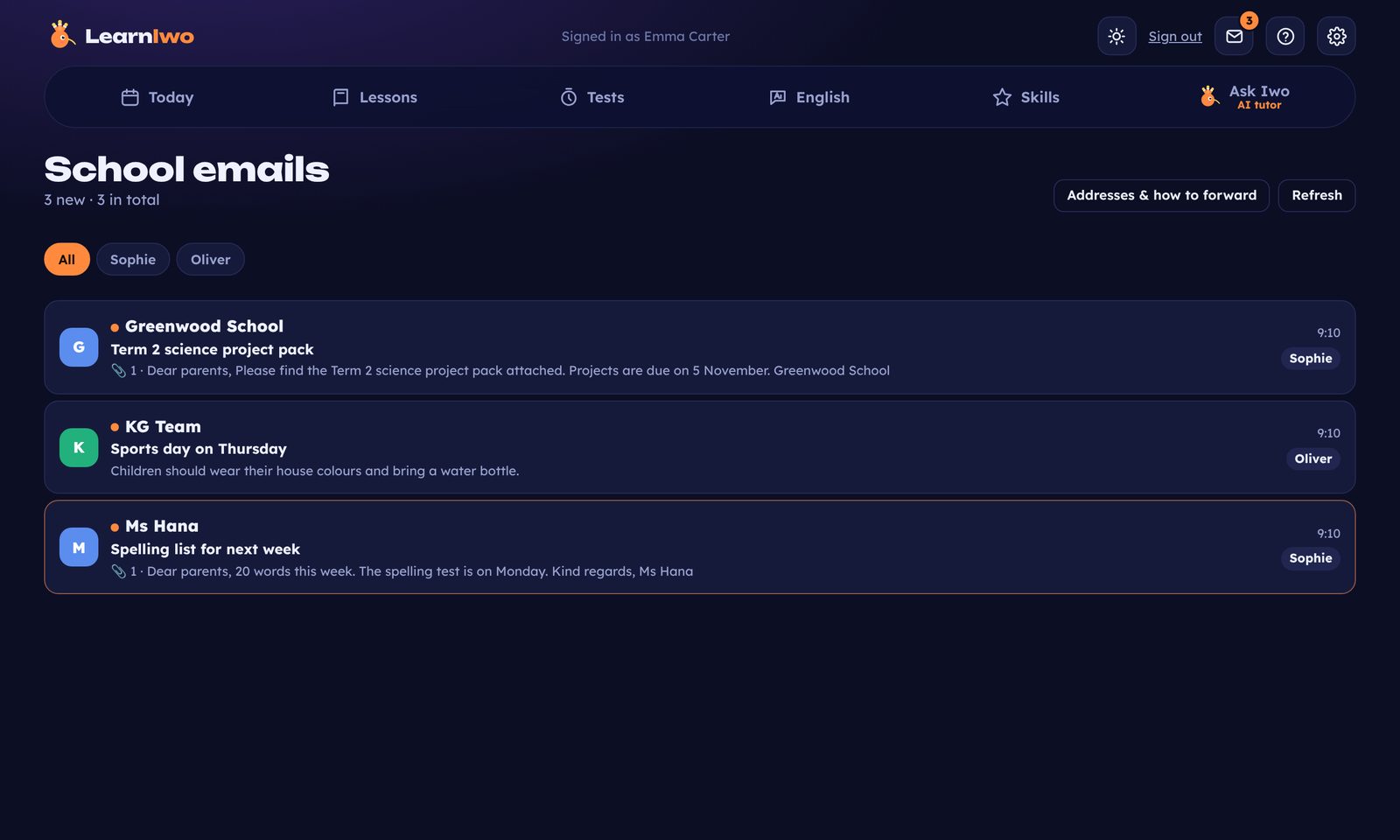
The School emails inbox: Greenwood School, KG Team and Ms Hana, sorted by child with attachments
School emails

Every school email, organised by child.

Each child gets their own address. Forward school emails from Gmail or Outlook, by hand or with a rule, and they arrive in Learniwo with every attachment.

sophie.ae@inbox.learniwo.com
Only your emails get in
From your address, your spouse's and one more you confirm.
Your child sees their own
And ticks off what's done. You see the tick.
Beyond the syllabus

Skills that school doesn't always have time for.
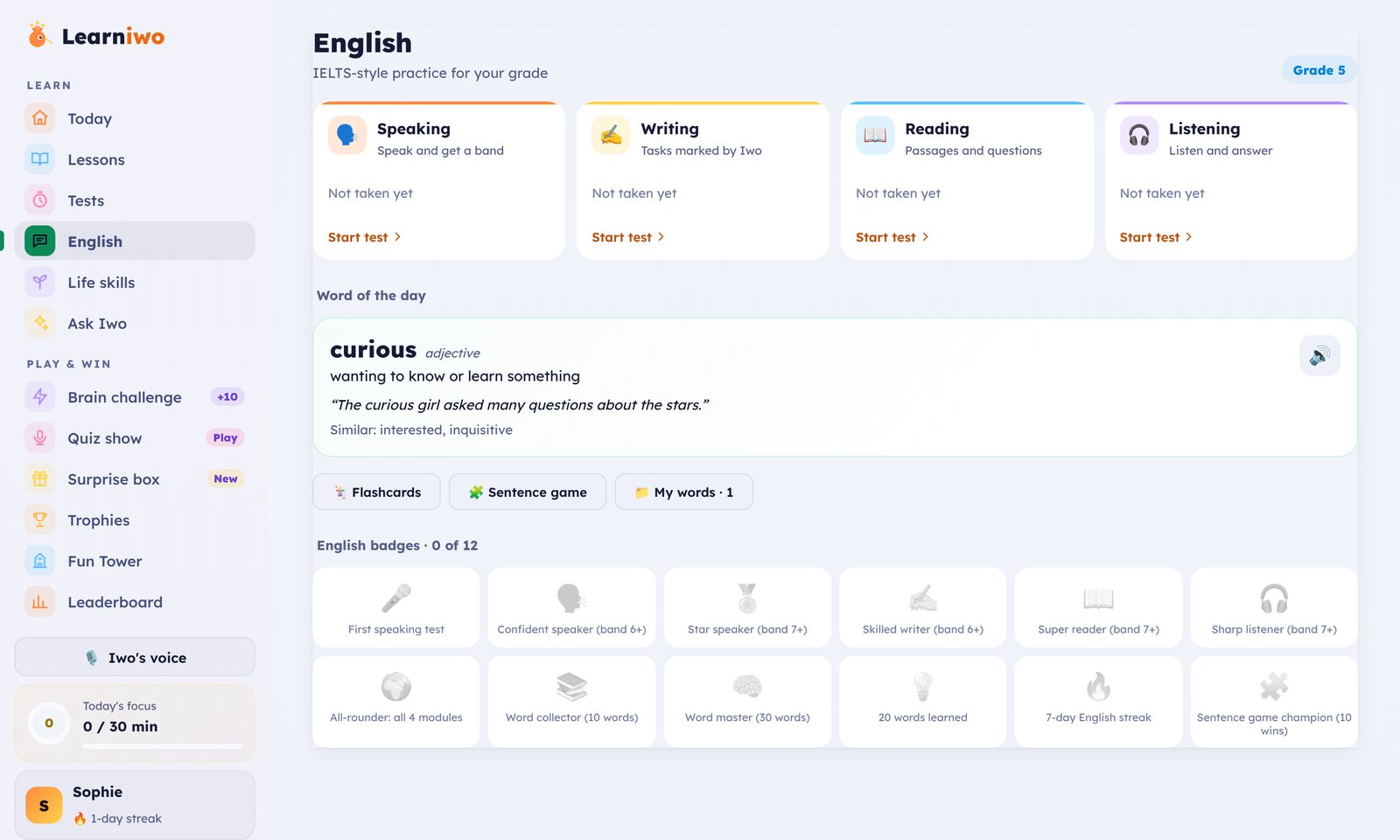
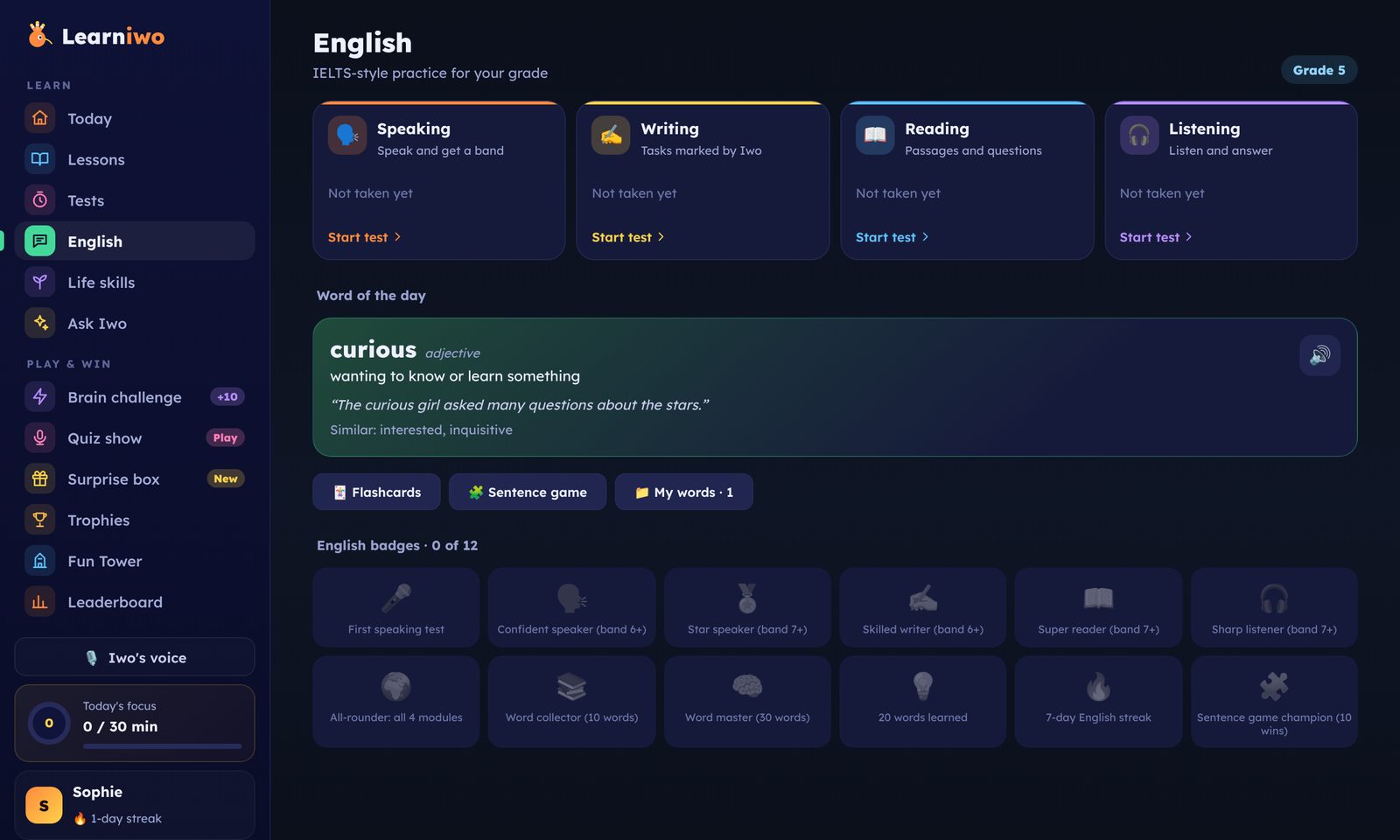
English practice: speaking, writing, reading and listening, with the word of the dayEnglish practice: speaking, writing, reading and listening, with the word of the day
English that gets spokenIELTS-style speaking, writing, reading and listening for each grade. Speak, get a band score and a tip.
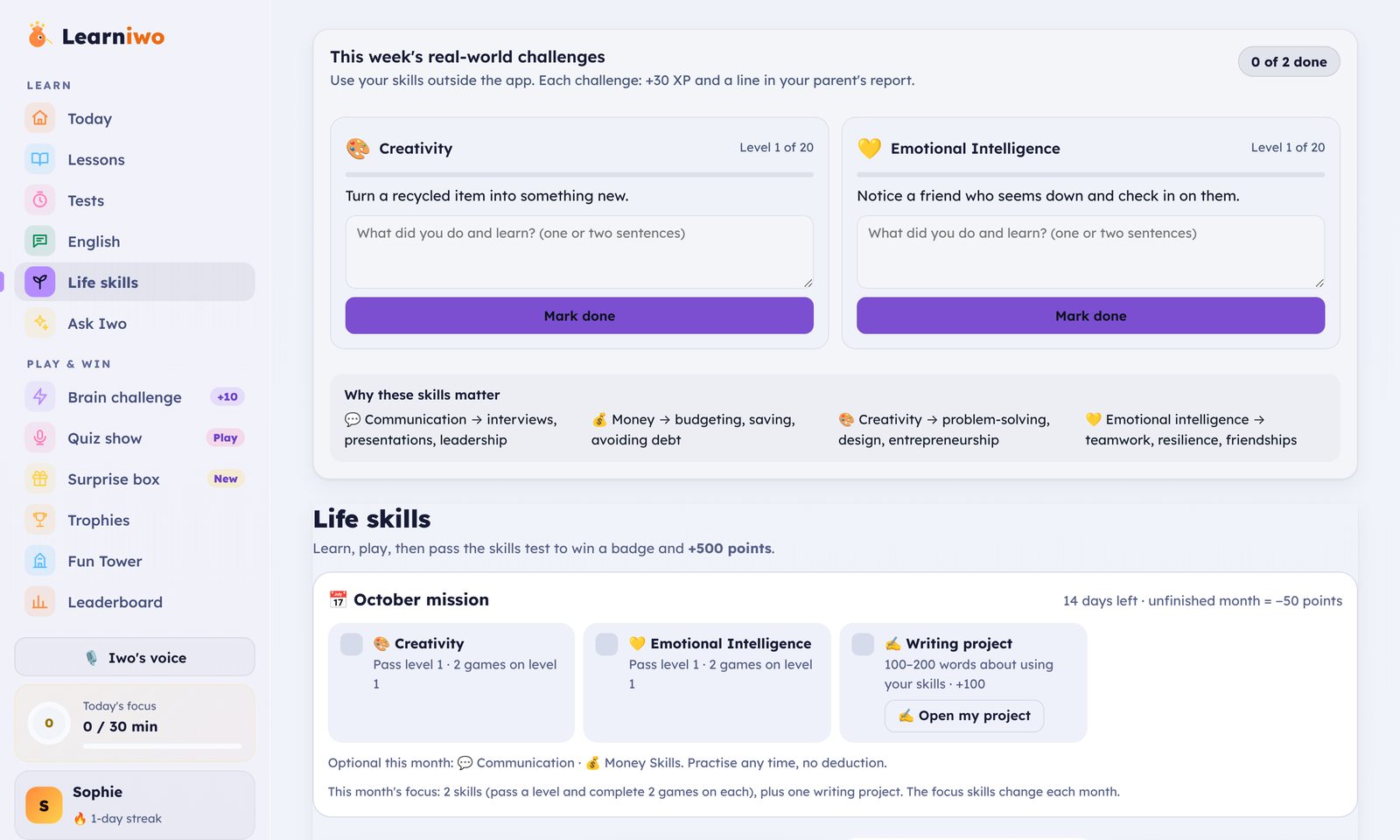
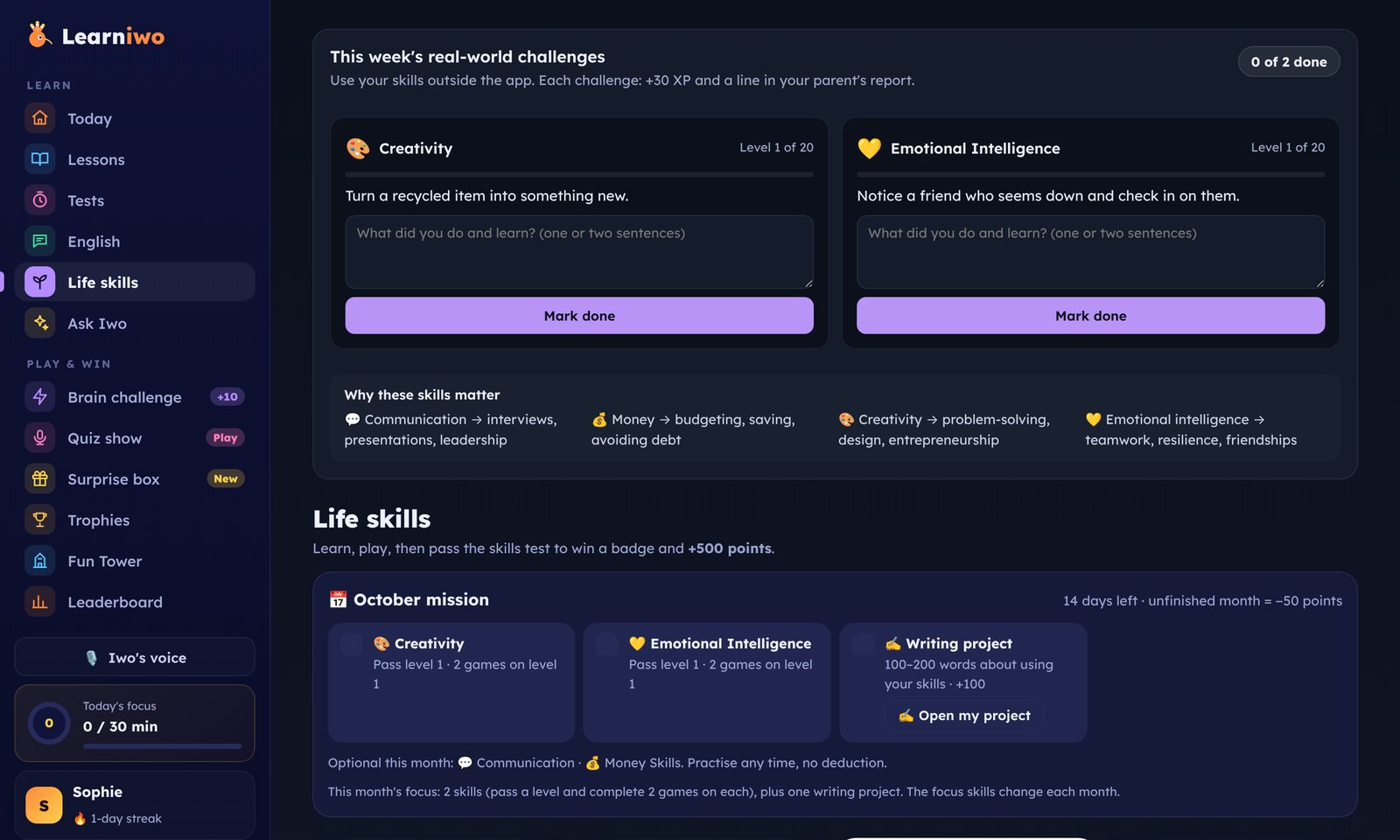
Life skills: real-world challenges in creativity and emotional intelligenceLife skills: real-world challenges in creativity and emotional intelligence
Life skills, level by levelCommunication, money, creativity and emotional intelligence. 20 levels each, with real-world challenges.
For parents

Two parents. One clear view.

See what each child did today, what's due, and what school sent. Your spouse gets their own login, so you're both in the loop without forwarding a thing.

Family dashboardEach child's day, focus minutes, points and what's due, at a glance.
Second-parent loginThe same family view for your spouse. Account changes stay with you.
Add lessons and testsUpload a lesson or create a test and it appears in your child's plan.
Pocket money with purposePoints turn into rewards that you approve.
Monthly certificatesSent to you as an image and an A4 PDF.
Daily safety noteIf the AI tutor flags a question, you hear the same day.
Pre-school to Grade 10

It grows up with your child.

PRE-SCHOOL · NURSERY · KGEarly yearsPicture cards, letter of the day, balloon games and Iwo reading aloud. No tests, no uploads.
GRADE 1 – 4PrimaryLearning blocks for maths, reading, spelling and handwriting, plus the lessons you add.
GRADE 5 – 10Middle and secondaryTimed tests, homework help, English bands, life-skills projects and world games.
Safety and values

An AI tutor that teaches, not one that does the work.

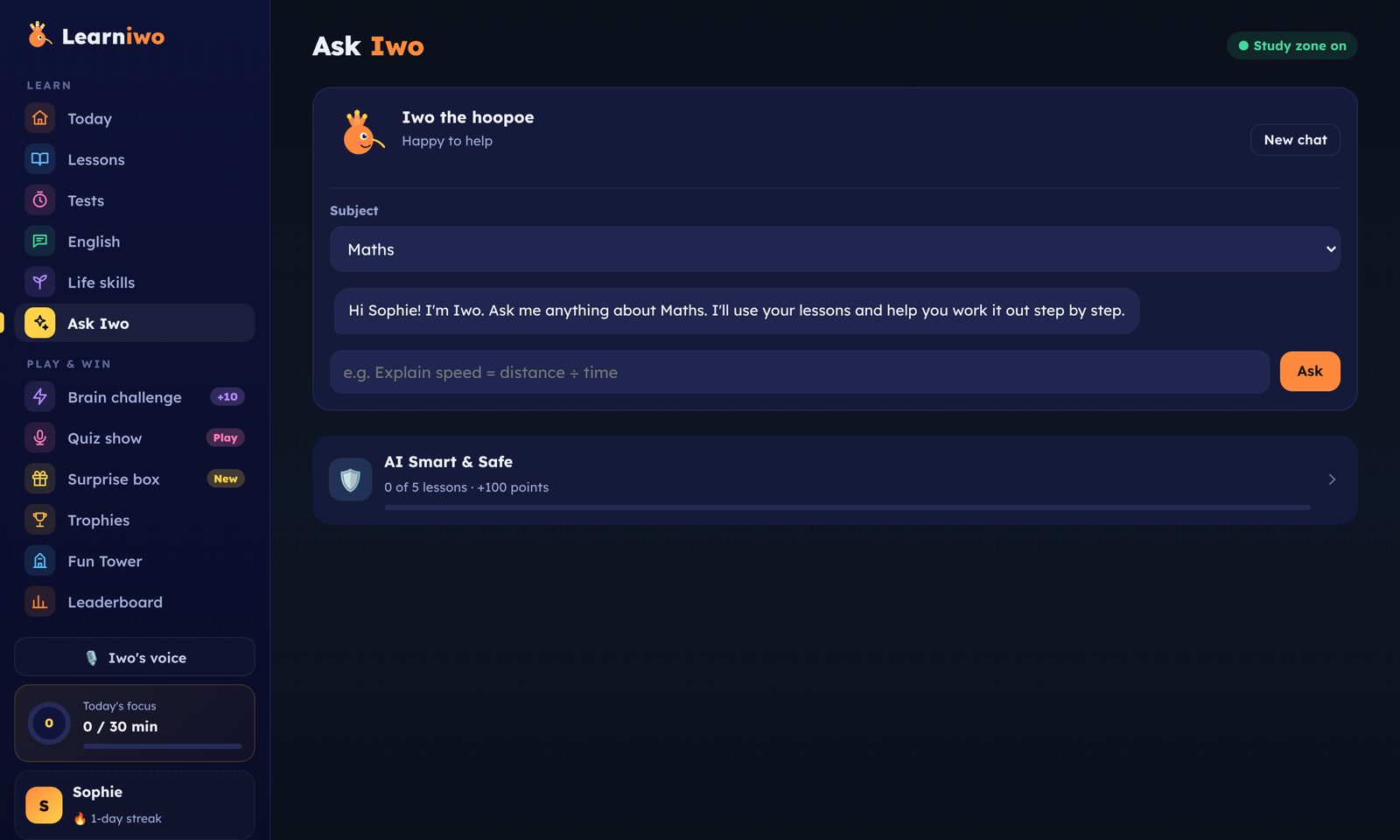
Ask Iwo explains, gives examples and checks your child's thinking. It stays on study topics, and every student signs a study promise before they start.

  • Every family approved before their account opens
  • AI Smart & Safe course each month for students and parents
  • Content that fits your values, in lessons, games and rewards
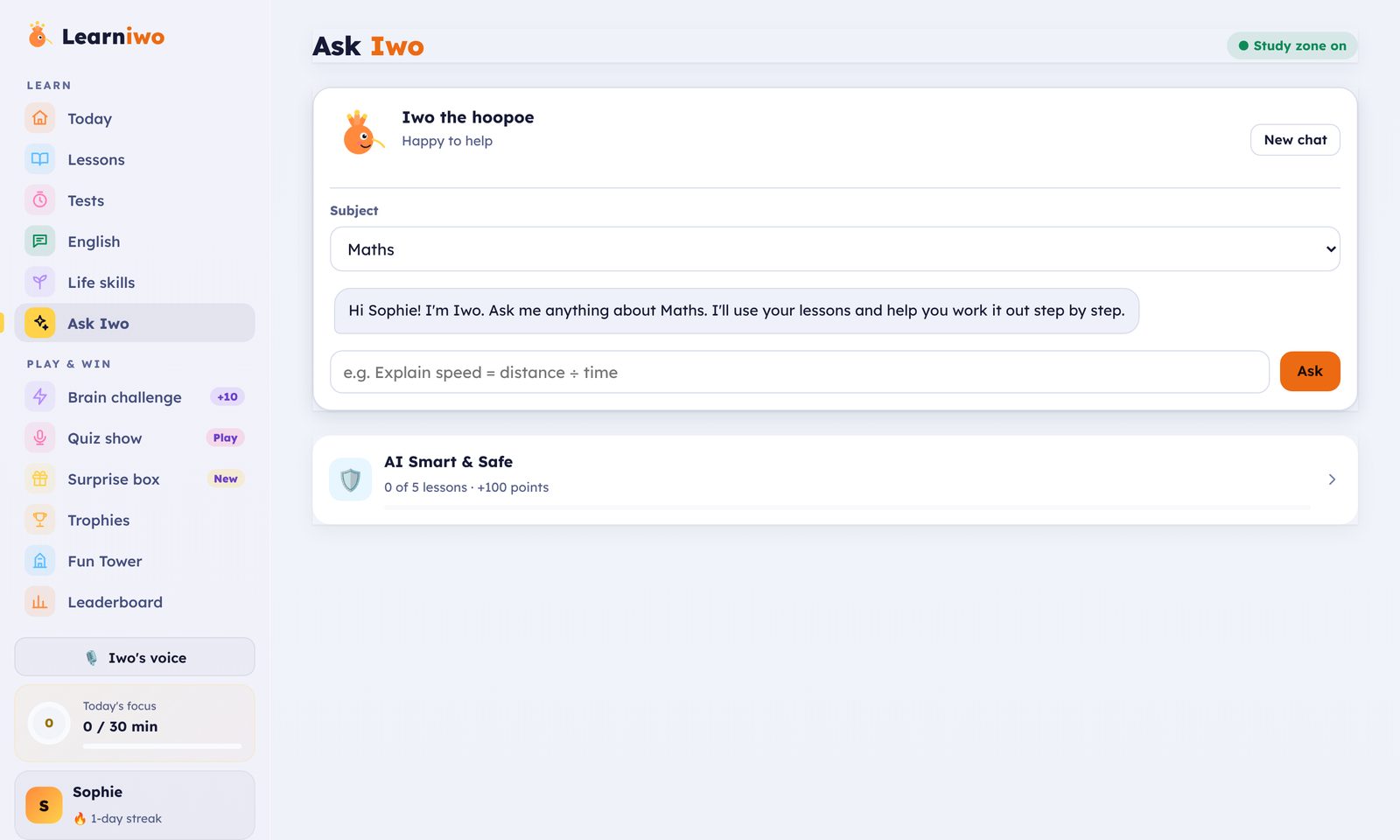
Ask Iwo with the study zone on, and the AI Smart and Safe courseAsk Iwo with the study zone on, and the AI Smart and Safe course
Early access

Free for every family while we grow.

We're opening Learniwo to families now and improving it with them every week. Early-access families get everything, free. We'll tell every family well before anything changes.

Family planEarly access
Freeduring early access

No card needed. Every family is checked and approved.

  • Every feature, for every child in your family
  • A login for both parents
  • A school-email address for each child
  • Ask Iwo, the safe AI tutor

Also on your phone and tablet

Learniwo works in any browser. Add it to your home screen for one-tap access. Nothing to download from a store.

Questions parents ask

Something else?

Is Learniwo free?+

Yes, while Learniwo is in early access. We'll tell every family well before anything changes.

Which ages is it for?+

Pre-school to Grade 10. Learniwo changes with your child's grade, from picture games for the youngest to tests and projects for older students.

How do school emails get into Learniwo?+

Each child has an address like sophie.ae@inbox.learniwo.com. Forward school emails to it from your own email, one at a time or with an automatic rule. Only your own addresses can send to it.

Can both parents use it?+

Yes. The main parent adds a second parent with their own login. You both see the same children, lessons and school emails.

Is the AI tutor safe for my child?+

Iwo only helps with study topics and gives hints rather than answers. Anything worrying is flagged, and parents get a daily summary.

Do I need to download anything?+

No. Learniwo runs in your browser on any computer, tablet or phone. You can add it to your home screen if you like.

Give your child one place to learn.

Add your children, invite your spouse and start today. Free during early access.

LearnIwo

The learning home for your family, from Pre-school to Grade 10.

Product
Learniwo
Account
© 2026 LearniwoFree for every family during early access.
Features

Everything in Learniwo, in one place.

Lessons, tests, English, life skills, a safe AI tutor, games and every school email, for Pre-school to Grade 10. Watch the walkthrough, from signing in to ticking off a school email.

Early accessFree for every family right now. All features, every child in your family, no card needed.
How it works · about 1½ minutes · real app, no sound

Daily learning

A clear plan every day, built from your child's own school work.

  • Today's planWhat to study, what's due this week, and the next step.
  • 30-minute focus timerA short daily habit with streaks and missions.
  • Lessons from school filesTake a photo or add a PDF, Word, PowerPoint, text or lesson video. Iwo turns it into easy notes, flashcards and a quiz.
  • Syllabus topicsPick lessons by grade and subject when there's nothing to upload.
  • Timed tests20 questions in 30 minutes. Maths is done on paper and checked from a photo.
  • Mistakes and fix-it lessonsEvery wrong answer becomes a short lesson until it sticks.
  • Homework helpSnap a question and Iwo coaches your child through it.
  • Progress by subjectSee which topics are strong and which need practice.

English

IELTS-style practice set for each grade.

  • SpeakingSpeak, get a band score and a tip.
  • WritingWriting tasks marked by Iwo.
  • Reading and listeningPassages and audio with questions.
  • Word of the dayA new word every day, with flashcards and games.

Life skills

Real-world skills that school doesn't always teach.

  • Four tracksCommunication, money, creativity and emotional intelligence.
  • 20 levels eachOne level a month, with a skills test and a badge.
  • Real-world challengesWeekly tasks to try outside the app.
  • Writing projectsA short project each month from Grade 4.
  • You set the paceChoose 1 to 4 skills a month for each child.

Ask Iwo & AI safety

AI that helps your child learn, with parents in the loop.

  • Ask IwoA tutor that explains, gives examples and checks thinking. It never does homework for them.
  • Study zoneIwo stays on study topics.
  • Study promiseEvery student agrees to use AI honestly before they start.
  • AI Smart & Safe courseA short monthly course for students and parents.
  • Daily safety summaryIf Iwo flags a question, parents hear the same day.

Games & rewards

Learning that feels like play, and effort that pays off.

  • Learning gamesBrain challenge, Quiz show, Surprise box, Iwo's world, Fun Tower and Iwo Jump.
  • World gamesWorld Flights and Geo Detective for geography and general knowledge.
  • Points, badges and trophiesEvery finished step earns points.
  • LeaderboardFriendly competition with family and friends.
  • Monthly certificatesSent to parents as an image and an A4 PDF.
  • Pocket moneyPoints turn into rewards that a parent approves.

Young learners

Pre-school to Grade 3: pictures, sounds and gentle play.

  • Picture cards and letter of the dayBuilt in, no uploads or tests for the youngest.
  • Pop the balloonsA letter game with a surprise picture.
  • HandwritingTrace letters and words.
  • Spelling and readingSchool words, sounds and read-along stories.
  • MathsNumbers and shapes, up to 1,000 and fractions.
  • Iwo's voiceIwo reads aloud for children who are still learning to read.

School emails

Every school email in one inbox, sorted by child.

  • An address for each childLike sophie.ae@inbox.learniwo.com, ready when you add your child.
  • Forward by hand or automaticallyFrom Gmail or Outlook, one at a time or with a rule.
  • Only your emails get inMail is accepted from your own address, your spouse's and one extra email you confirm.
  • AttachmentsFiles arrive with the email. Large files can be uploaded by hand, up to 25 MB.
  • Your child sees their ownStudents read their school emails in their app.
  • Tick it doneParent or child marks an email done, and both see it.

For parents

One view of every child, shared by both parents.

  • Family dashboardEach child's day, focus minutes, points and what's due.
  • Second-parent loginYour spouse gets their own login. Account changes stay with you.
  • Add lessons and testsUpload a lesson or create a test, and it appears in your child's plan.
  • Pocket money approvalsApprove rewards your child asks for.
  • Safety summariesA daily note if the AI tutor flagged anything.
  • Certificates and newsletterMonthly certificates and news about new features, by email.
  • Invite a familyWhen an invited family is approved, every child in both families gets 200 points.
  • Your settingsCountry and currency, light or dark theme, install on your home screen, and delete your account and data any time.
Early access

Free for every family while we grow.

We're opening Learniwo to families now and improving it with them every week. Early-access families get everything, free. We'll tell every family well before anything changes.

Family planEarly access
Freeduring early access

No card needed. Every family is checked and approved.

  • Every feature, for every child in your family
  • A login for both parents
  • A school-email address for each child
  • Ask Iwo, the safe AI tutor

Are you a teacher?

LearnIwo

The learning home for your family, from Pre-school to Grade 10.

Product
Learniwo
Account
© 2026 LearniwoFree for every family during early access.

Move to the new database

Copies every family, child, lesson, test, wallet and tutor from the old database to the new one. Safe to run again: anything already copied is skipped.

Become a Learniwo tutor

Supervise children's learning in your subject. After you apply: 1 a general test, 2 a subject review, 3 a short AI interview, then our team reviews your profile.

Subjects you teach (up to 3)
Age groups
Please confirm

Tutor sign in

Create your family account

For parents and guardians. You'll add your children next.

🎉 A friend invited you! When your family is approved, each of your children gets +200 points.

Please confirm

After you sign up, our team reviews and approves new families, usually within a day.

Already have an account?

Welcome back

Sign in to follow your children's progress.

·

Hey! Ready to level up?

Use the username and PIN your parent made for you.

Forgot your PIN? Ask your parent. They can change it in Settings → Family → Edit.

What's waiting for you
🧠Brain challengeA new puzzle every day
🎤Quiz showBeat your best score
🎙️Speak & get a bandEnglish, IELTS-style
⏱️30-min focusUnlock a surprise gift
🏆Badges & certificatesGold, silver, bronze
🎡PlaylandRooms, outfits, surprises

Reset your password

We'll email you a 6-digit code.

No email arriving?

Enter the code

Contact support

Send us a message. Our support team will reply to you by email.

Choose a new password

You signed in with a temporary password from our support team. Choose your own password to continue.

✓

Thanks! We're reviewing your family

We review new accounts to keep Learniwo a safe space for children. We'll email as soon as you're approved, usually within a day.

★

Your study promise

Before you start, read these and tick each one.

Privacy

Version 2026-10

Who can use Learniwo

Accounts are created by a parent or legal guardian for children aged 2 to 16 (Pre-school to Grade 10). Children under 8 use it with a parent or carer beside them. Children never sign up themselves and don't need an email address. We review new accounts before first use to keep Learniwo safe for children.

What we store

  • Parent: name, email, country, password (scrambled so no one can read it) and the confirmations you gave at sign-up.
  • Child: first name, age, grade, a username and a PIN (scrambled).
  • Schoolwork the child adds: lesson files' text, notes, tests, answers, photos of written answers, scores and wallet points.
  • School emails you choose to forward to your family address, and the briefs made from them.

How it is used

Only to run Learniwo for your family: making revision notes and tests, marking answers, showing progress and sending your school brief. We never sell your data, show ads, or use it to build profiles of children.

Who can see it

Only you and your children, each child seeing only their own work. Lesson text, answers and photos are sent to our AI provider (Anthropic) to make notes and mark tests; the provider does not use it to train its models. Our admin team can see family names, emails and children's first names, ages and grades to approve accounts, but not their schoolwork.

Your controls

You can remove a lesson, remove a child with all their data, or delete your whole account from the Parent tab at any time. Deletion is permanent.

Advice for children

Children should not type personal details (address, phone number, school passwords) into Learniwo. The tutor is told to steer away from personal topics.

How Learniwo uses AI

Version 2026-10

What it is for

Revising lessons that have already been taught at school, practising with timed tests, and finding and fixing mistakes. That's all.

What it is not for

Doing homework, assignments, projects or coursework. The tutor is instructed to refuse to solve work that will be handed in, and to explain the idea with a different example instead. Homework should always be the child's own work.

AI can make mistakes

Notes, questions and marking are produced by AI (Claude, by Anthropic). They are usually right but not always. You can review every test before assigning it and remove any question. Teachers and textbooks remain the final word.

Fair and kind

Feedback is written to be encouraging and right for the child's age: playful songs, stories and picture questions for Pre-school, Nursery and KG, simple steps for Grades 1 to 6, and exam-style practice for Grades 7 to 10. Marking of handwritten maths gives part credit for the right method.

A parent stays in charge

Parents set the tests, check the questions, decide what points are worth and see every answer. Please supervise your child's use, especially at first.

Next step

Add your child

Your child signs in with this username and PIN. No email needed.

Signed in as admin

Admin console

LearnIwo
Hello
Today's missions0 of 3
0%
Finish your missions to fill the bar.
Level 1 Streak 0 days Lessons done 0
Grade 7 · Year 8

Hey there

Your children

Tap a card to flip it
Loading…

Iwo's daily note

🎮 Game break · 5 min a day
Missions
Explore

Needs you today

More for this child

🛡️ Tutor alerts

Day by day

Today

On this day

Tests, homework and events from school emails show up on their day.

Fun Tower

🧗 ⭐☁️☁️
Floor
0 / 150
0%

    Every point takes you higher. Finish this year's course (about 6 months) to reach the top!

    This week's plan

    Your coach is preparing the week…

    Leaderboard

    Points from tests + 2 per lesson finished in Learn mode

      📝 Progress update

      Summarises lessons by subject, test results, weak spots and upcoming school dates, and suggests what to focus on tonight.

      Lessons

      Upload school lessons, pick syllabus topics and follow progress.

      Lessons

      Add your class notes, or learn a topic from the syllabus.

      Add a school lesson

      + Upload lessons Take a photo of the lesson, or choose files: PDF, Word, PowerPoint, text, photos or a lesson video
      or drag and drop files here
      Ready to add

      👆 Choose the subject to continue.

      🗺️ Syllabus topics

      No school lesson to upload? Pick any topic from this year's syllabus to get a ready-made lesson, then learn it step by step and test it like a school lesson.

      📚 Lessons by subject

      Only subjects for this child's class, country and curriculum are listed.

      📈 Skill by subject

      Average scores by subject appear after the first test.

      📚 School lessons

      No lessons yet. Add the first one above.

      Tests

      Create timed tests and follow results and fix-it lessons.

      +Create a new testFrom lessons or the syllabus▾
      Completed lessons

      Tip: uploaded lessons give the closest match to what the teacher covered. Use this when lessons aren't available.

      Pick the topics already taught this term.

      Mistakes to fix

      Every question you got wrong, with the right answer and why. Try each one again in your head, then tap Got it.

      Tests

      Timed tests from your parent. Every mark is a point.

      No tests yet. When you mark a lesson complete, your parent can set a test on it.

      🌟 Life Skills

      Life skills

      Learn, play, then pass the skills test to win a badge and +500 points.

      Loading…

      Ask Iwo

      ● Study zone on
      Iwo the hoopoe
      Happy to help

      Wallet

      How you earn

      1 mark= 1 point. Every mark you score in your tests counts.
      1 point, added to your wallet straight away.
      BonusYour parent can add bonus points for great effort.

      Parent controls

      History

      Finish a test to earn your first points.

      Settings

      ?
      Help & support
      Quick answers, or send a ticket to our team and follow the reply here.

      👩‍🏫 Human tutors

      A vetted tutor supervises your child in one subject: they see progress and mistakes in that subject (never the wallet or private chats), set tests, send work back for learning and write notes that you always see too.

      Find a tutor for

      Choose a subject and search. Only tutors who passed all checks and teach your child's age group are shown.

      Family

      + Add another child

      Second parent

      Loading…

      School emails

      Your family's forwarding address
      …

      In your email (Outlook, Hotmail or Gmail), make a rule that forwards school emails to this address. Every afternoon you'll get one brief, day by day, and tests and homework appear in your child's planner.

      🏆 Leaderboard: family & friends

      Link with other families (e.g. cousins) or add your child's friends. The other parent must accept. Only usernames, school year, country and points are shown: never names, emails or money.

      Link another family
      Add a friend

      🤖 AI declarations

      Each month you and each child complete AI Smart & Safe and sign a declaration about using AI well. Signed declarations are kept here.

      Loading…

      🎁 Invite a family

      Loading…

      💬 Tell us what you think

      How is Learniwo working for your family? Every message is read by the founder.

      Account

      📊 Weekly report email
      🔔 Reminders on this deviceGet a note when the weekly report is ready. Turn on reminders on your child's device too (from their Today screen) for a daily streak reminder.
      📲 Install Learniwo on this phone
      Open it from your home screen like an app.
      Change my password
      Delete my account and all data

      This permanently deletes your account, your children's logins, lessons, tests, wallets and school briefs. It can't be undone.

      Help & support

      My tickets

      Ask for help

      How urgent is it?

      The reply appears here, with a red dot on the ? button at the top.

      Quick answers

      How does my child sign in?

      On the first screen tap Student sign in and enter the username and PIN you made for them. You can see the username and change the PIN in Settings (⚙) → Family → Edit.

      I forgot my password

      Sign out, then tap Forgot password? on the sign-in screen. If no email arrives, tap Can't sign in? Get help from support and we'll reset it for you. You'll get a temporary password and choose your own when you sign in.

      Sign-in says "Too many tries"

      After 8 wrong tries, sign-in pauses for 15 minutes to keep accounts safe. Wait and try again, or send a ticket and we'll unlock it.

      How do points and pocket money work?

      Your child earns points for lessons, tests and Life Skills. At 10,000 points they can ask to swap them for pocket money, and you approve it in their wallet. Approved money goes to their Money Bank. You can change the value of a point in Settings → Family → Edit.

      Why can't my child open the next Life Skills level?

      One level per skill each month. The next level opens on the 1st of next month once this level's test, 2 games and (from Grade 4) the monthly writing project are done. The Skills tab shows what's left.

      How do I add a lesson or set a test?

      Your child adds school lessons in the Lessons tab (photo, PDF or Word file). In the Lessons tab you can tap Test this lesson, or make a test from the syllabus in the Tests tab.

      What is the daily AI limit?

      Each family has a daily number of AI actions (making notes, tests, marking and tutor chats). It resets at midnight your time.

      How do I put the app on my phone?

      On Android tap 📲 Install app at the top. On iPhone open the site in Safari, tap Share, then Add to Home Screen.

      Admin

      Tutor applications

      📲 Install Learniwo
      1. Tap the Share button ⬆️ at the bottom of Safari
      2. Choose Add to Home Screen
      3. Tap Add
      AI Smart & Safe

      Lesson

      Monthly writing project

      My real-life story

      Level

      Lesson

      ⭐ 0